
Most of us treat n8n webhooks as plumbing. Something sends a request, the workflow does its job, and a bit of JSON goes back to whoever asked. It turns out the reply can be a whole web page. Open the webhook URL in a browser and you get a styled, readable page, with no hosting, no separate site and no deploy step.
I found this out earlier this week, and not because I went looking. I'd asked Claude to turn a one-off sales report for a client into a weekly one, built entirely in n8n rather than the small Railway app we'd normally put a report page on. Its plan had n8n answer a webhook with HTML instead of data. It tested the idea on a throwaway workflow first, then handed me a link, and the link was the report.
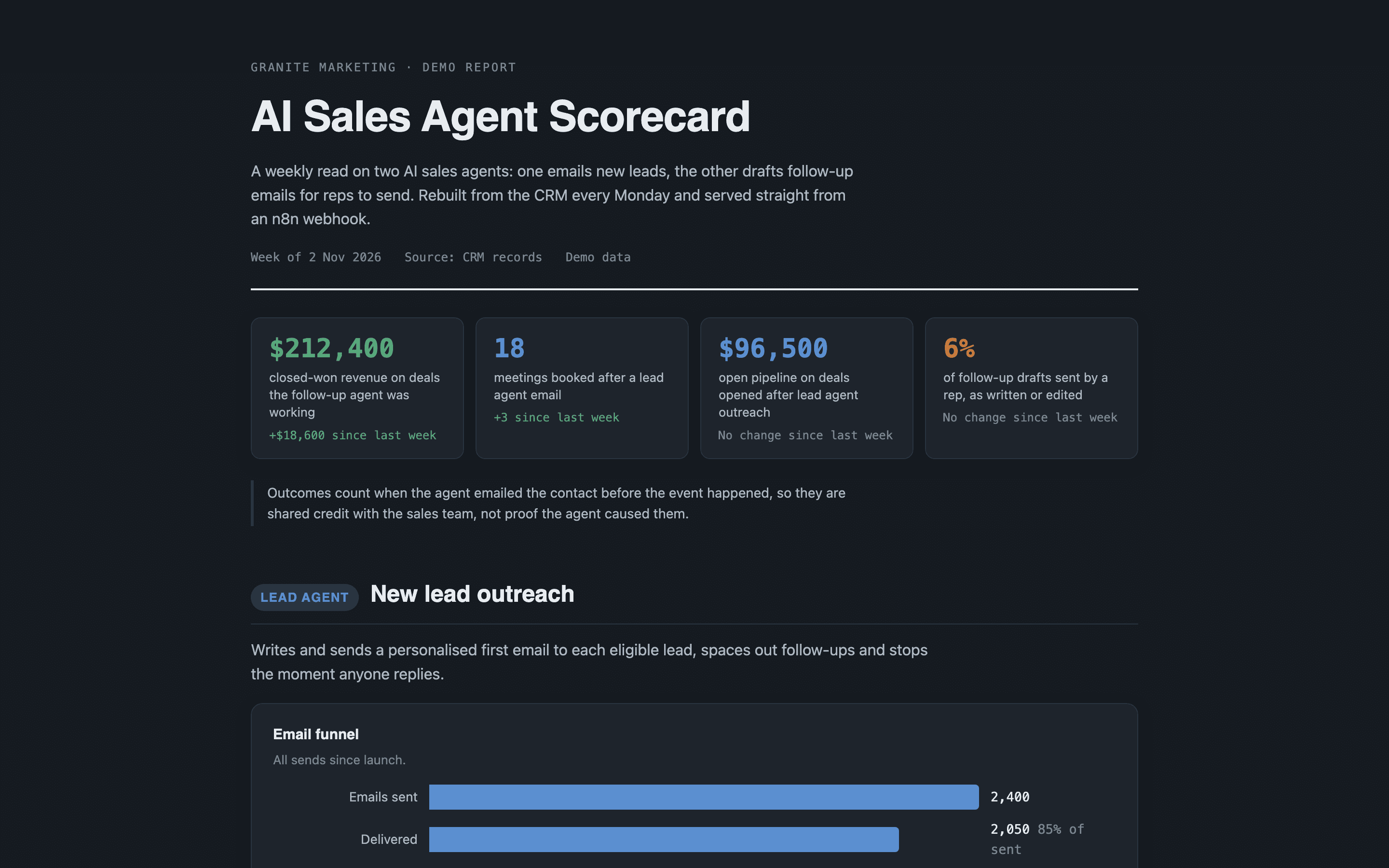
A simplified demo version of the report page, with illustrative figures. Open the full demo report to scroll the whole thing.
My reply isn't fit for a blog either, but it was roughly 'you're a genius', followed by: does anyone actually know n8n can do this?
Some people do. It's in the Respond to Webhook docs, which say the Text option sends HTML by default. Most of us just never point a webhook at a browser. This post covers how to build one, the pattern that makes it worth doing, and the limits you'll hit.
Why it works
A webhook is a web address that n8n answers. Your browser doesn't care who answers a URL, only what comes back. If the response says and the body is HTML, the browser renders it like any other website.
That means n8n is acting as the web server. Every time someone opens the link, the workflow runs from the top, so the page is built fresh on each request from whatever data the workflow reads.
When to use it
This fits anything read-only that a small group opens by link:
- weekly reports and scorecards
- status pages for a pipeline or a sync
- a summary page a Slack message can link to, when the Slack message itself is too cramped
The alternative is usually a dashboard tool with its own logins and licences, or a small hosted app with its own repo, deploys and bill. For a page a handful of people open once a week, both are a lot of machinery.
How to build one
Prerequisites
- An n8n instance (cloud or self-hosted) on a recent version
- Some data to show. A Data Table, a Google Sheet or an API call all work.
Step 1: Add a Webhook node
Add a Webhook node, set the HTTP method to (that's what a browser sends when you open a link) and give it a long, random path. The path is effectively your page's address, and on a link-only page it's also your access control, so don't call it .
Set Respond to Using 'Respond to Webhook' Node. That tells n8n to wait for the rest of the workflow and send back whatever the final node says, instead of replying straight away.
Step 2: Read your data
Add whichever node fetches the data you want on the page. In our build that's a Data Table node using the Get operation, which reads the stored weekly rows.
Step 3: Build the HTML in a Code node
A Code node takes the data and returns one item with the finished page as a string. Here's a minimal version that picks the newest row and renders a few figures:
// Escape anything that came from data before it goes into HTML
function esc(value) {
return String(value ?? '').replace(/[&<>"']/g, function (c) {
return { '&': '&', '<': '<', '>': '>', '"': '"', "'": ''' }[c];
});
}
const rows = $input.all().map(function (item) { return item.json; });
rows.sort(function (a, b) { return String(b.weekOf).localeCompare(String(a.weekOf)); });
const latest = rows[0];
const body = latest
? `<h1>Weekly report</h1>
<p class="muted">Week of ${esc(latest.weekOf)}</p>
<div class="tiles">
<div class="tile"><span>${esc(latest.leadsWorked)}</span>Leads worked</div>
<div class="tile"><span>${esc(latest.meetingsBooked)}</span>Meetings booked</div>
</div>`
: '<h1>No report yet</h1><p>The first week has not been built.</p>';
const html = `<!doctype html>
<html lang="en">
<head>
<meta charset="utf-8">
<meta name="viewport" content="width=device-width, initial-scale=1">
<meta name="robots" content="noindex, nofollow">
<title>Weekly report</title>
<style>
body { font-family: system-ui, sans-serif; margin: 0 auto; max-width: 960px; padding: 24px 16px; color: #1a1a1a; }
.muted { color: #666; }
.tiles { display: grid; grid-template-columns: repeat(auto-fit, minmax(160px, 1fr)); gap: 12px; }
.tile { border: 1px solid #ddd; border-radius: 8px; padding: 16px; }
.tile span { display: block; font-size: 2rem; font-weight: 600; }
</style>
</head>
<body>${body}</body>
</html>`;
return [{ json: { html: html } }];The field names (, , ) are placeholders, so swap in your own columns. The function matters more than it looks: if any of your data contains a , it would otherwise break the page or inject markup into it.
Step 4: Add a Respond to Webhook node
Set Respond With to Text and put in the response body. Text sends by default, so there's nothing else to set for the page to render.
Under Response Headers it's worth adding with the value , as a second guard alongside the meta tag in the HTML.
Step 5: Publish and open the production URL
The test URL only works while you're listening for a test event in the editor. To get a link you can share, publish the workflow and use the production URL. Open it in a browser and you should see your page.
The pattern that makes it worth doing: store data, render on request
The build for our client splits the job across two workflows, and that split is the most useful thing I'd pass on.
The client's sales team runs two AI agents. One works leads, and the other writes follow-up email drafts and drops them into the CRM as tasks for reps to send. The question was whether reps actually sent those drafts, and whether it made any difference to their deals.
- The weekly workflow runs every Monday. It pulls the CRM data, works out for each draft whether the rep sent it as written, edited it or never used it, and whether it went out on time, then lines that up with deal progress and revenue. It stores the week as a single row in an n8n Data Table and posts a short summary to Slack with a link to the page.
- The page workflow is the webhook. When someone opens the link, it reads the latest row, renders the page and returns it.
The row holds the computed figures, never the HTML. That has a pleasant side effect: when I fix a layout bug or reword a heading, every past week picks up the fix, because no week was ever saved as a finished page. It also keeps the page fast, since opening the link never calls the CRM.
The first edition answered the question it was built for. Reps rarely sent the drafts, because tasks arrived faster than they could act on them. So the next step is making those tasks one-button actions, and the scorecard is now the before-measure for that change.
Tips and gotchas
Give it a phone layout. A link posted in Slack is just as likely to be opened on a phone. A viewport meta tag, a max width and a grid that wraps (as in the example above) cover most of it. Check the page at around 375 pixels wide before you share it.
Add noindex. The page isn't listed anywhere, but links leak through forwarded messages and browser history. The meta tag and the header together tell search engines to leave it alone.
Use absolute URLs. n8n's docs note that relative URLs, such as a form posting to , won't work from these pages. Link to full addresses.
Every view is an execution. Each time someone opens the page, the workflow runs once. For a weekly report opened by a handful of people that's nothing, but it's worth knowing before you put a page in front of a large audience.
Handle the empty case. Before the first week runs, there's no data to show. Return a simple placeholder page so the link never errors. The example code does this.
The limits
Since version 1.103.0, n8n sandboxes HTML responses from webhooks to protect the instance and its users. The page still renders normally, and in our testing web fonts, dark mode and phone layouts all worked. The sandbox does rule some things out:
- no cookies or local storage, so the page can't remember anything between visits
- no logins or sessions, so it can never be a real app
- scripts can't reach the top-level window
For access, you have two sensible options. The simplest is a long, unguessable path, shared only with the people who need it. If you want a password, the Webhook node supports Basic auth, which puts a username and password in front of the URL itself.
When a report needs logins per person, filters that save, buttons that change data, or real traffic, it has outgrown this pattern, and a proper app is the right call.
Conclusion
For read-only reports, scorecards and status pages, a webhook that returns HTML gives you a shareable page with almost no moving parts. Store the data, render it on each request, make it work on a phone and keep it out of search. We're planning to run our own read-only reports this way rather than standing up separate pages on Railway.
If you want to try n8n patterns like this without starting from a blank canvas, our free n8n template library is a good place to start.


