


If you’ve ever tried to sync n8n workflows from GitHub into your instance, you’ve probably hit one of two problems: either you import everything blindly and overwrite stuff you didn’t mean to touch, or you manually cherry-pick files one at a time like it’s 2015.
Most import tools assume your workflows live in a flat folder. They don’t handle nested structures. They don’t let you choose what to import. And they definitely don’t give you a clean UI to control the process.
This tutorial walks through building a GitHub-to-n8n importer that solves all of that. It’s designed for teams that store workflows in organised repos: think /clients/acme/, /staging/, /production/, and need selective, controlled imports without the chaos of recursive triggers or bulk overwrites.
You’ll learn how to traverse a GitHub repo, generate a dynamic form for selection, and safely import workflows using n8n’s REST API. No recursion. No guesswork. Just a clean, deterministic queue-based system.
If you manage multiple n8n instances, work with client-specific workflows, or just want better control over what gets imported and when, this is for you.
The Problem This Solves
Let’s say you’re storing your n8n workflows in GitHub. Smart move: version control, collaboration, rollback capability. But now you need to get those workflows into your n8n instance.
Here’s what usually happens:
Option 1: Bulk import everything
You pull the entire repo and import every JSON file. This overwrites active workflows, imports drafts you didn’t mean to touch, and generally creates a mess. It sometimes also need to be done with an empty n8n instance, if you’re using the terminal for example.
Option 2: Manual import
You download individual files, open the n8n UI, and import them one by one. This works for three workflows. It’s painful for thirty.
Option 3: Flat-folder scripts
Most GitHub import templates assume all your workflows live in a single directory. If you’ve organized things into folders: /clients/, /staging/, /production/, those scripts break or ignore structure entirely.
This workflow solves all three problems:
- It traverses nested folders in your GitHub repo
- It generates a dynamic form so you can choose exactly which workflows to import
- It safely constructs API payloads that respect n8n’s import requirements
- It skips or overwrites based on your preference, so you don’t accidentally nuke production workflows
You get controlled, structured imports. GitHub stays your source of truth. Your n8n instance stays clean.
How It Works: The Architecture
This isn’t a recursive mess. It’s a state-driven queue system that processes one folder at a time, builds a list of available workflows, and lets you decide what to import.
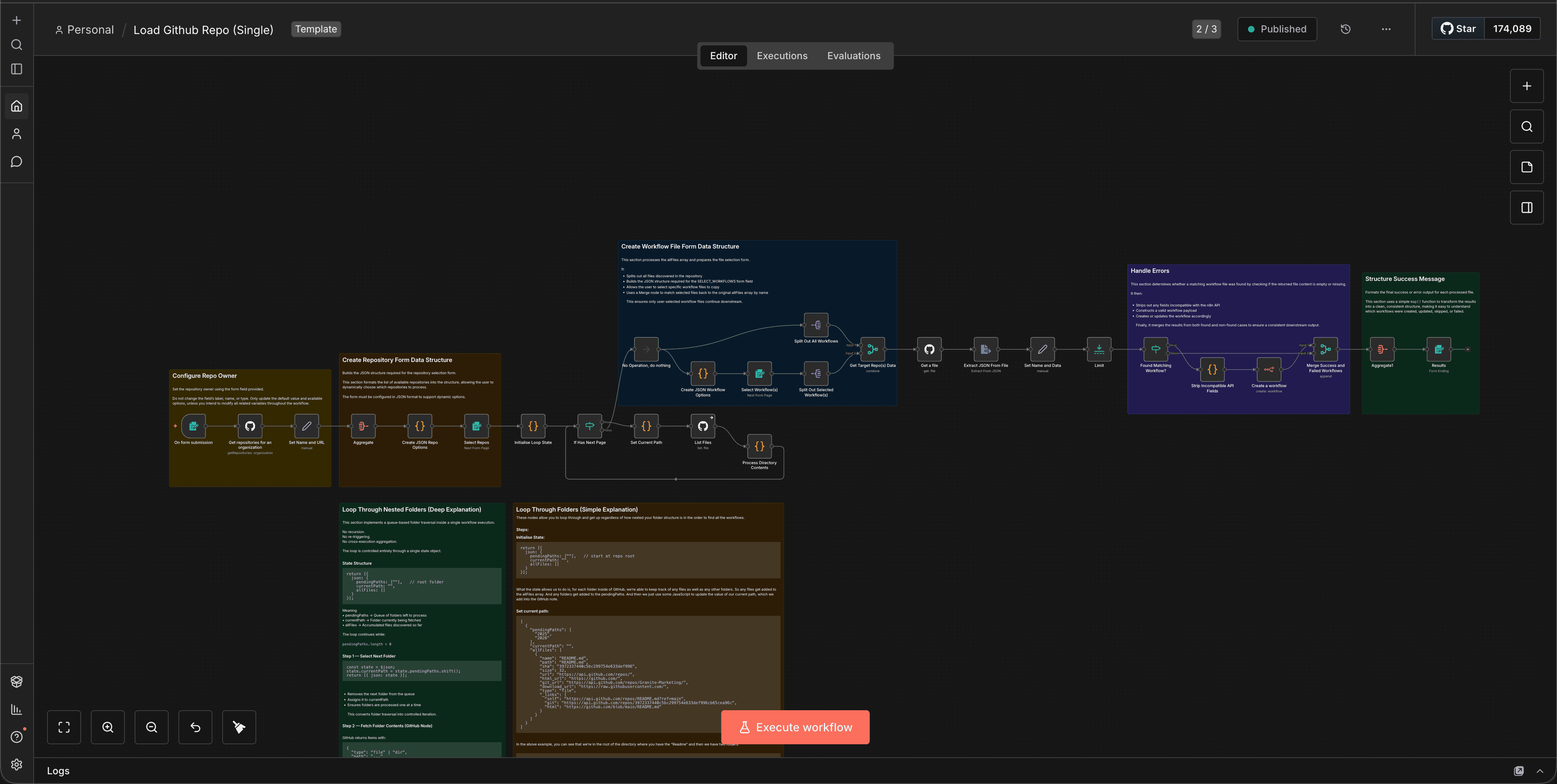
Here’s the flow:
- Traverse the GitHub repo using a queue-based loop (no recursion)
- Collect all workflow JSON files from nested folders
- Generate a dynamic form with checkboxes for each workflow
- Let the user select which workflows to import
- Transform each selected file into a valid n8n import payload
- Send it to the n8n REST API with overwrite control
The key insight: instead of triggering new executions or recursively calling itself, the workflow uses a queue stored inside workflow state to track folders it needs to visit. It processes one folder, adds any subfolders to the queue, and repeats until the queue is empty.
This is essentially breadth-first traversal, implemented entirely inside n8n.
Prerequisites
Before you start, you’ll need:
- An n8n instance (self-hosted or cloud)
- A GitHub repository containing your workflow JSON files
- A configured GitHub credential inside n8n (OAuth2 or Personal Access Token)
- Basic familiarity with n8n’s GitHub and Code nodes
If your workflows are stored in a private repo, make sure your GitHub credential has repo scope.
Step-by-Step: Building the Importer
Step 1: Set Up the Trigger and Initial State
Start with a Manual Trigger node. This workflow runs on-demand, not on a schedule.
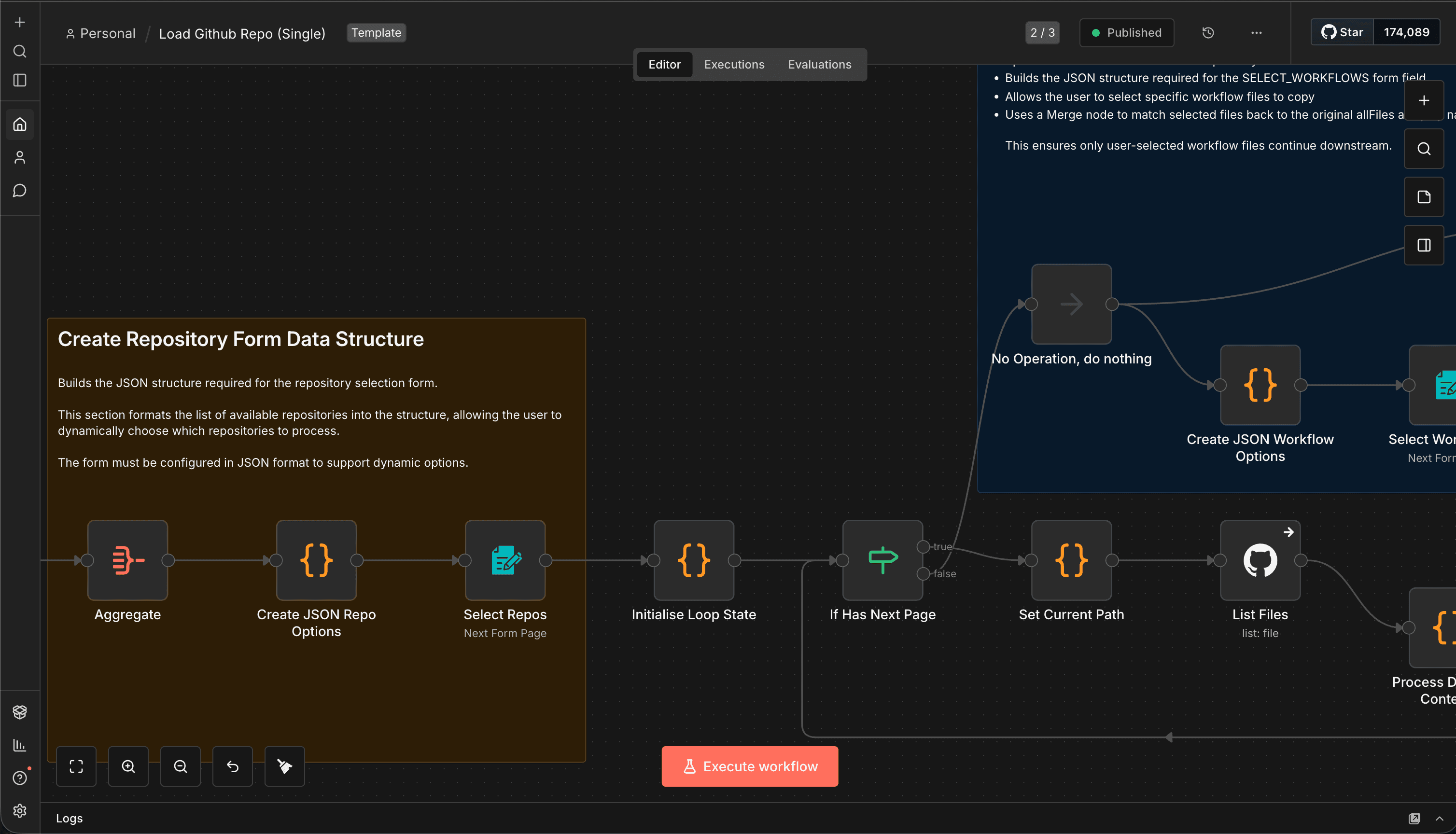
Add a Code node immediately after the trigger to initialise the traversal state:
return [{
  json: {
    pendingPaths: [""],   // start at repo root
    currentPath: "",
    allFiles: []
  }
}];
Why this matters:
The pendingPaths array holds folders we need to visit. The allFiles array will collect all the workflow JSON files we find. By starting with a queue instead of recursion, we avoid execution limits and make the process deterministic.
Step 2: Build the Traversal Loop
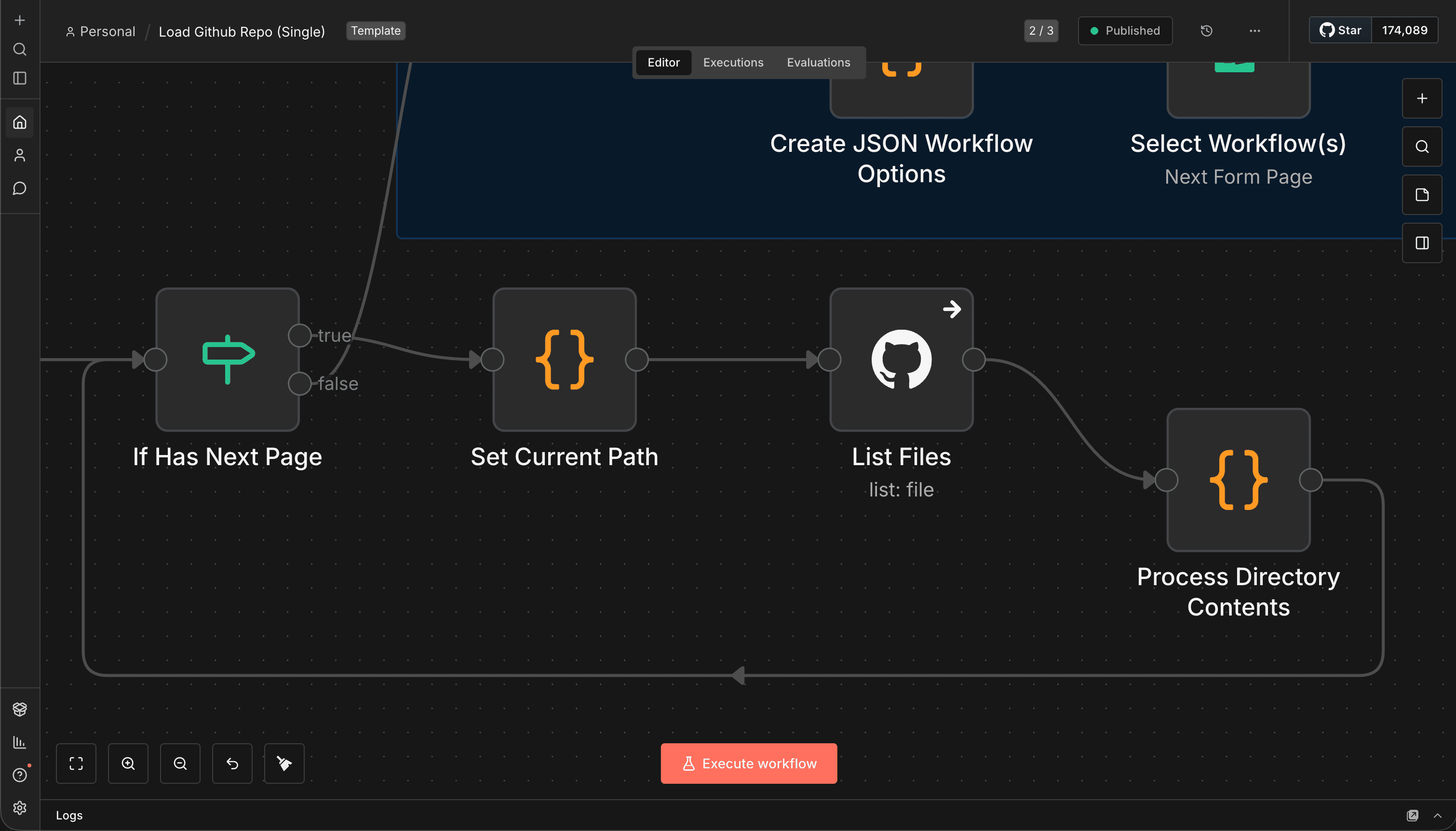
Instead of using a Loop Over Items or Split In Batches node, the workflow uses:
- A Code node to shift the next folder from the queue
- A GitHub node to list folder contents
- A Code node to update state
- An IF node to determine whether the loop continues
Set Current Path (Code Node)
const state = $json;
state.currentPath = state.pendingPaths.shift();
return [{ json: state }];
GitHub Node Configuration
- Resource: File
- Operation: List
- Path: =
{{ $json.currentPath }} - Authentication: GitHub credential
Process Folder Contents (Code Node)
const state = $('Set Current Path').all()[0].json;

state.pendingPaths ??= [];
state.allFiles ??= [];

// get ALL items from the GitHub node
const entries = $input.all().map(i => i.json);

for (const entry of entries) {
  if (entry.type === "dir") {
    state.pendingPaths.push(entry.path);
  } else if (entry.type === "file" && entry.name.endsWith(".json")) {
    state.allFiles.push(entry);
  }
}

return [{ json: state }];
The IF node checks:
pendingPaths.length > 0
If true → continue loop
If false → traversal complete
This avoids recursion entirely.
Step 3: Generate a Dynamic Form for Selection
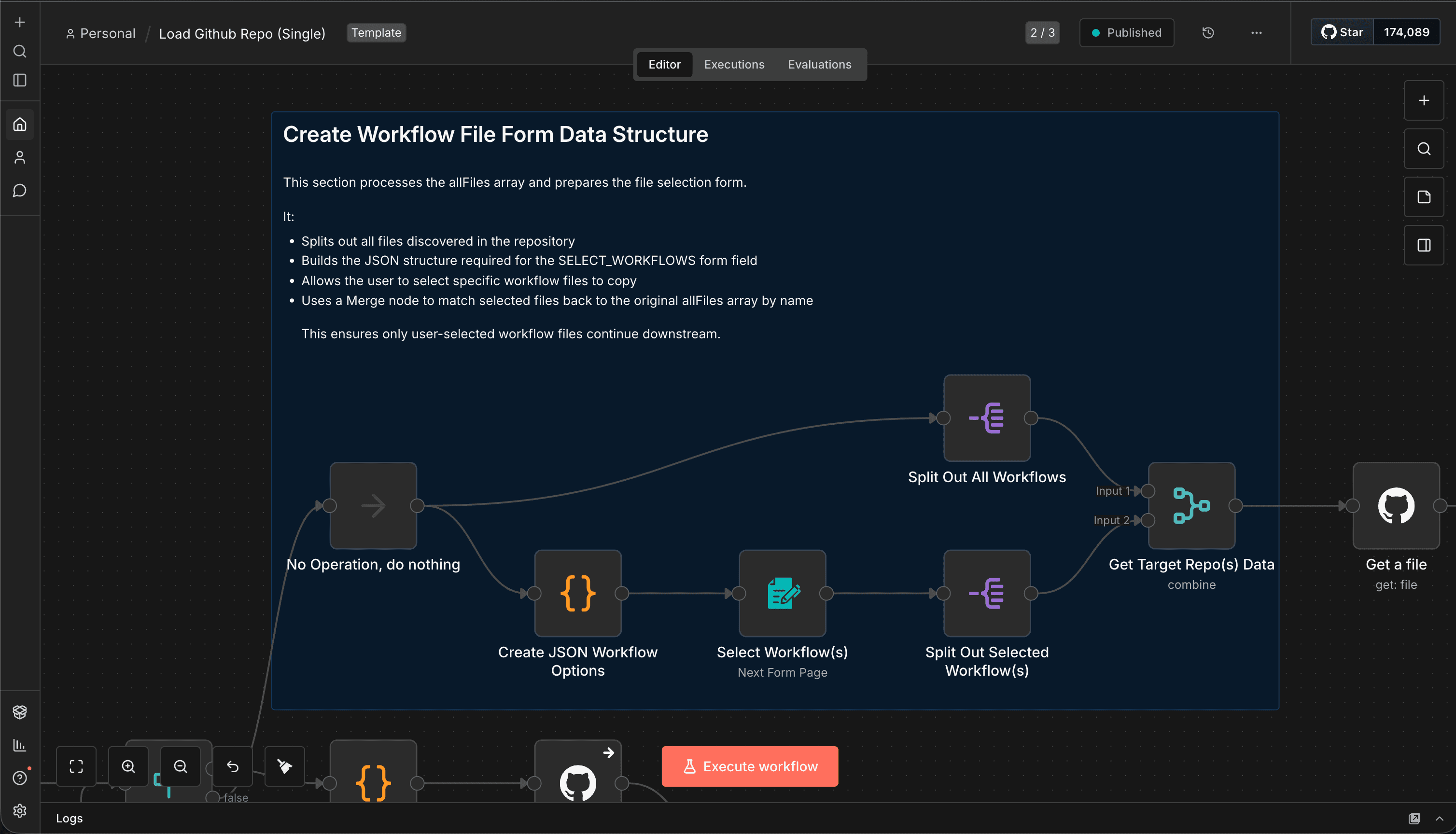
Once traversal is complete, pass the allFiles array to a Code node:
const data = $input.first().json.allFiles;

const options = data.map(item => `{"option": "${item.name}"}`).join(",");

return {
  json: {
    options,
  },
};
Now add a Form node:
- Field Type: Multi-select or Checkboxes
- Options: ={{ $json.formOptions }}
- Label: “Select workflows to import”
Step 4: Download and Transform Selected Workflows
After the user submits the form, you’ll receive selected download_url values.
Fetch each workflow JSON (via GitHub node or HTTP Request).
Code Node (Transform for n8n Import)
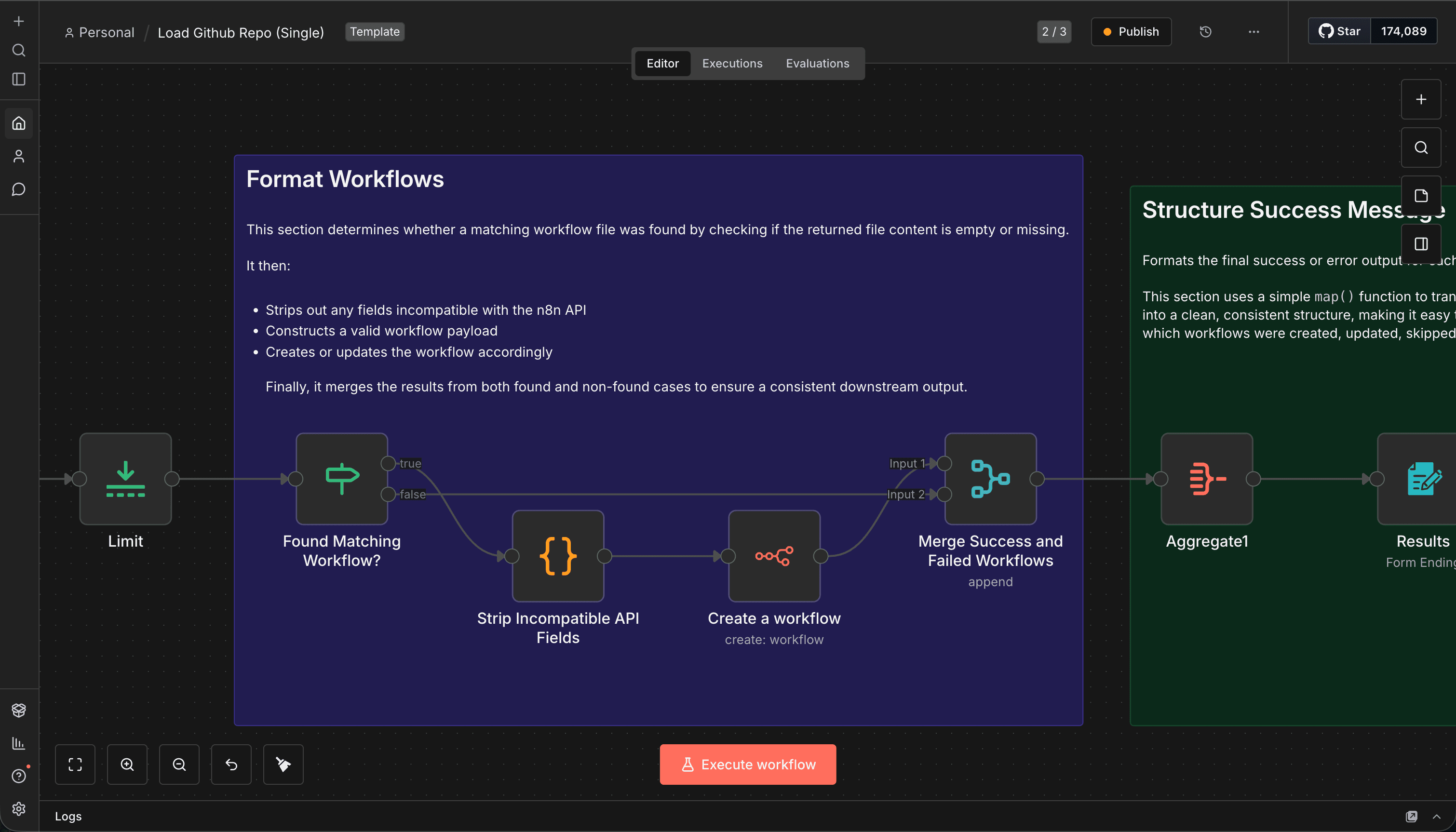
Raw workflow JSON from GitHub cannot be sent directly to the n8n API.
The API expects the workflow object itself — not wrapped inside a workflow property.
/**
 * Build an n8n-API-safe workflow payload
 * using a strict allowlist (NOT a denylist).
 */

// --------------------
// Helpers
// --------------------

function pick(obj, allowedKeys) {
  if (!obj || typeof obj !== 'object') return {};
  return Object.fromEntries(
    Object.entries(obj).filter(([key]) => allowedKeys.includes(key))
  );
}

function cleanNode(node) {
  return {
    id: node.id,
    name: node.name,
    type: node.type,
    typeVersion: node.typeVersion,
    position: node.position,
    parameters: node.parameters ?? {},
    credentials: node.credentials ?? {},
    disabled: node.disabled ?? false,
    notes: node.notes,
    notesInFlow: node.notesInFlow,
  };
}

// --------------------
// ENTRY POINT
// --------------------

const source = $json.data;

// ---- Top-level allowlist ----
const workflow = {
  name: source.name,
  nodes: source.nodes.map(cleanNode),
  connections: source.connections,
};

// ---- Settings allowlist ----
const ALLOWED_SETTINGS = [
  'timezone',
  'executionTimeout',
  'saveExecutionProgress',
  'saveManualExecutions',
  'errorWorkflowId',
];

if (source.settings) {
  const cleanedSettings = pick(source.settings, ALLOWED_SETTINGS);
  if (Object.keys(cleanedSettings).length > 0) {
    workflow.settings = cleanedSettings;
  }
}

// ---- Optional staticData ----
if (source.staticData) {
  workflow.staticData = source.staticData;
}

return workflow;
Step 5: Import into n8n via REST API
HTTP Request Node (Import Workflow):
- Method: POST
- URL: https://your-n8n-instance.com/api/v1/workflows
- Authentication: API Key
- Body Content Type: JSON
- Body: =
{{ $json.toJsonString() }}
Do not wrap the payload inside:
{ "workflow": ... }
The workflow object itself must be the body.
Code Snippets: Key Patterns
Queue-Based Traversal (No Recursion)
state.currentPath = state.pendingPaths.shift();
Loop continues while:
pendingPaths.length > 0
Safe Workflow Transformation
delete workflowData.id;
delete workflowData.createdAt;
delete workflowData.updatedAt;
Valid fields:
{
  "name": "...",
  "nodes": [...],
  "connections": {...},
  "settings": {}
}
Always validate before sending to the API. n8n's error messages aren't always clear about what's wrong with the payload.
Tips & Gotchas
1. GitHub API Rate Limits
If you're traversing a large repo, you might hit GitHub's rate limit (60 requests/hour for unauthenticated, 5000/hour for authenticated). Always use a personal access token.
2. Workflow Name Collisions
If two workflows have the same name, n8n will create duplicates unless you implement overwrite logic. Consider adding a unique prefix or timestamp to imported workflow names.
3. Credentials Don't Transfer
When you import a workflow, credential references are preserved but the actual credentials aren't. You'll need to reconnect credentials manually after import.
4. Test with a Small Repo First
Before running this on your production repo with 200 workflows, test it on a small test repo. Make sure the traversal logic works and the form generates correctly.
5. Use Branches for Staging
Instead of separate repos, consider using branches (main, staging, dev) and adding a branch selector to the form. This keeps everything in one repo while maintaining separation.
Real-World Use Cases
Multi-Client Agencies
Store workflows in /clients/acme/, /clients/globex/, etc. Import only the relevant client's workflows into their dedicated n8n instance.
Staging → Production Promotion
Develop workflows in a staging instance, push to GitHub, then selectively import into production. This gives you a review step and rollback capability.
Disaster Recovery
If your n8n instance goes down, you can spin up a new one and restore workflows from GitHub in minutes instead of hours.
Team Collaboration
Multiple developers work on workflows locally, push to GitHub, and the lead imports the approved ones into the shared instance.
Why This Approach Matters
Most import tools are built for convenience, not control. They assume you want everything, all at once, with no questions asked.
This workflow is built for teams that need:
- Selective imports (not everything in the repo is production-ready)
- Structured repos (folders matter, hierarchy matters)
- Overwrite control (don't accidentally nuke a live workflow)
- Deterministic behavior (no recursion, no execution limits, no surprises)
It's not just an importer. It's a controlled workflow loading system built around state management and API safety.
As your n8n usage grows — more instances, more workflows, more collaborators — this kind of tooling becomes essential. GitHub is your source of truth. This workflow is how you bridge that truth into your running instances without chaos.
Conclusion
Building a smart GitHub-to-n8n importer isn't just about moving files around. It's about respecting structure, giving users control, and avoiding the footguns that come with bulk operations.
By using a queue-based traversal model, you avoid recursion limits and make the process predictable. By generating a dynamic form, you give users the power to choose what gets imported. And by carefully transforming payloads before sending them to n8n's API, you ensure clean, conflict-free imports every time.
If you're managing workflows across multiple instances, working with client-specific setups, or just want better control over your import process, this pattern is worth adopting.
Start small. Test with a simple repo. Then scale it to your production setup. Once you've got this running, you'll wonder how you ever managed workflows without it.
Want to see this in action? Check out the full workflow template. Import it into your n8n instance and customise it for your repo structure.


